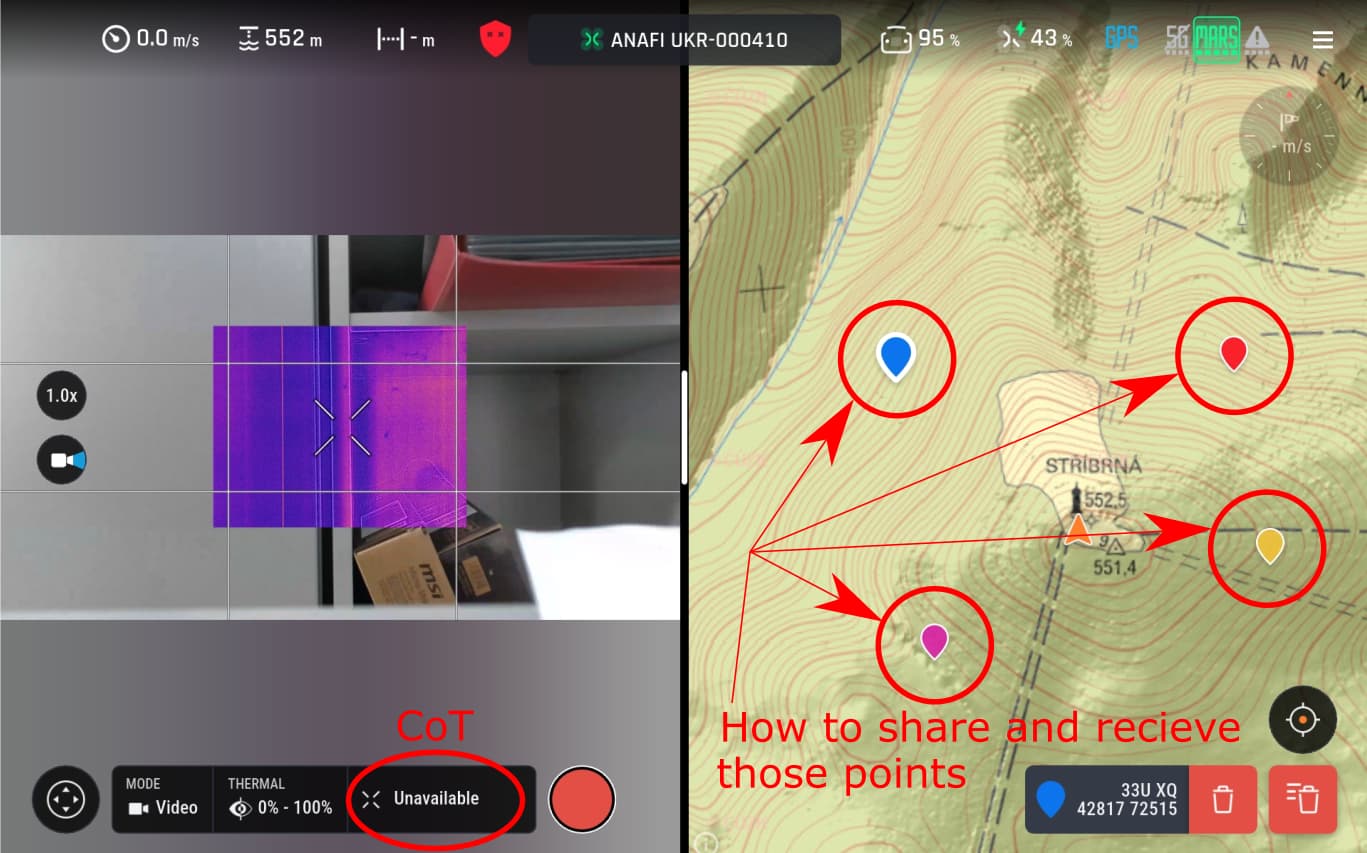
I am opening this new topic to continue the discussion from our previous thread, which was automatically closed due to inactivity: [Link to original topic: COT extraction from RTSP stream]
Context: Our goal is to extract telemetry metadata (Protobuf/vmeta) from an RTSP stream (sourced from SkyController UKR) for integration with ATAK (CoT). As previously discussed with Remi, we are targeting a NanoPi environment. Remi suggested using pdraw_coded_video_sink to extract Protobuf metadata without the CPU overhead of full video decoding.
The Problem: We are currently unable to move forward because we cannot compile libpdraw within the Alchemy build system. When scanning our workspace, Alchemy automatically disables libpdraw due to missing dependencies.
During our build process, we receive the following error logs:
It appears our Linux-native target environment is missing the core modules required by libpdraw (protobuf-c, eigen, etc.).
Our request:
Could someone provide guidance on how to properly resolve these missing dependencies within the Parrot SDK/Alchemy environment?
Are there specific configuration steps we are missing to ensure Alchemy recognizes these modules?
Since we are using a NanoPi, is there a recommended way to build a “minimal” version of libpdraw that only focuses on the coded video sink extraction?
We have attempted to reach out via private messages to follow up on this, but unfortunately, we haven’t received a response. We would greatly appreciate any technical insight from the community or the Parrot team to help us resolve these dependency conflicts.
Thank you in advance for your time and assistance.
If you follow the installation procedure, it is already configured
You can apply this patch in packages/pdraw: raw_vsink_forum.patch (48.9 KB)
And look at the pdraw-vsink-test (./build.sh -p groundsdk-linux -A pdraw-vsink-test -j)
This tool extracts the battery level from the metadata of a stream or local video,
the option --no-decode allows to do it without decoding the frames
Hi Remy,
Thank you for your guidance on using libpdraw and the pdraw_coded_video_sink approach for metadata extraction. I have been investigating this path, but I am facing significant hurdles regarding the build environment.
To provide some context, I am working on a setup using a NanoPi (ARM) and a development machine running Ubuntu (x86_64). While I understand that the Alchemy build system is the standard way to compile Parrot projects, setting up the full environment with all its dependencies has proven to be extremely complex for my current setup, leading to various path and configuration issues.
I would like to clarify my options moving forward:
Full build approach: I am currently exploring the possibility of using an official Docker build container to cross-compile for my target (ARM64/ARMv7) to avoid local dependency issues.
Simplified alternative: I wanted to ask if there is any possibility of obtaining a pre-compiled version of the libpdraw library (or a minimal static build), which would allow me to implement a simple C++ parser for the Protobuf metadata without needing to initialize the entire Alchemy workspace?
Given that I primarily need to extract the GPS metadata (Protobuf) from the RTSP stream, is there a recommended “lightweight” way to achieve this, or is libpdraw the only viable solution?
Thank you for your time and for the support you provide to the community.
Best regards
Jindrich
Dear Jindrich, Parrot and Remy,
Just to let you know that you are not alone with the desire to get UKR into ATAK environment. We are also most interested in a simple solution to get UKR data into ATAK using the CoT protocol.
Is translating MAVLINK into CoT an option without taking the SkyController out of the equation? Can the MAVLINK data/protocols be accessed from an active SkyController (we want to continue piloting with the controller…)
BR
Thanks for jumping in! It’s great to know there is community interest in this.
To summarize where we are: we have successfully confirmed that the “PC bridge” approach works—using Olympe to route MAVLink/CoT data to ATAK. Our current focus, however, is hardware minimization . We are trying to move away from a full laptop and implement this solution on a small footprint device (NanoPi) to handle both the video decoding/parsing and the MAVLink-to-CoT conversion for ATAK.
Our main bottleneck is the libpdraw build environment for ARM. We are trying to isolate the metadata/Protobuf parsing from the RTSP stream without needing the full, complex Alchemy environment on every device.
To get back to our core technical challenge: does anyone have experience with a lightweight or static compilation of libpdraw for ARM, or is there a recommended way to cross-compile this specifically for NanoPi (ARM64/v7) without needing a full-blown build machine?
I think we got a bit lost in the build environment details, so I’d like to step back, provide the full context of what I’m building, and ask for your guidance on the best lightweight approach.
Project Context & Goal
I am building a dedicated edge router/bridge on a NanoPi (ARM64, Linux) equipped with two Ethernet ports:
Port 1: Connected to the Parrot system (192.168.53.x/24).
Port 2: Connected to an external network.
My objective is minimal and specific:
Extract drone position, controller position, and CoT (Cursor on Target) metadata from the stream/network.
Forward/multicast the raw UDP video stream to an internal network.
Send the extracted telemetry/CoT data as multicast packets to ATAK standard 239.2.3.1:6969 so it can be ingested by a BMS (Battle Management System).
I do not need flight control, command execution, or heavy GUI framework features.
Questions for the Community / Developers:
Bypassing Olympe / Full SDK build: Is there a recommended way to bypass the heavy Olympe/Alchemy ecosystem for a lightweight ARM64 C/C++ or Python binary?
Can libvmeta / SEI metadata parsing be linked standalone or parsed directly from RTP/H.264 SEI NAL units without pulling in libpdraw, pomp, and the whole SDK dependency graph?
RTSP Stream & Keyframe (IDR) Interval: The incoming video stream seems to have a long keyframe (GOP) interval, which causes some media players to lag or fail to render until the next keyframe arrives.
Is there a parameter/API call in the drone settings to request more frequent keyframes (GOP size adjustment)?
Or is full video transcoding (e.g., via ffmpeg / hardware H.264 encoder on NanoPi) required to inject keyframes on the fly?
Any advice, minimal working examples for standalone vmeta parsing, or best practices for this lightweight relay setup would be greatly appreciated!
To our knowledge, there is no real alternative to Alchemy (aside from compiling everything manually with gcc).
You can compile librtsp, libvideo-metadata, etc. individually to parse the RTSP stream yourself, but this essentially means reimplementing a significant part of what libpdraw already does.
There is currently no way to reduce the GOP (keyframe interval) in the SDK.
Our recommendation would be to first try building with Alchemy directly on your target. If that doesn’t work out, the next option is to build the individual libraries (librtsp, libvideo-metadata, etc.) separately, keeping in mind you’ll be reimplementing part of libpdraw’s logic.
An intermediate option would be to compile the Alchemy SDK once, then reuse the resulting headers and binaries in your own build system of choice, this is documented here: User Guide - 8.4.2
I wanted to share what we’ve accomplished today and the hurdles we’ve run into:
Alchemy Build Successful: We successfully built Alchemy within the GroundSDK environment.
Working HUD Display: Using the command ./out/groundsdk-linux/staging/usr/bin/pdraw -u rtsp://192.168.53.1/live --demux "1" -H 0, we managed to stream the live video with the HUD overlay directly from the drone.
GPS Extraction Issue: Despite having the video and HUD, we are currently unable to parse or extract GPS coordinates and position data from the live stream.
libvideo-metadata Limitations: We ran into roadblocks with libvideo-metadata (specifically vmeta-extract). It either rejects direct live RTSP streams (expecting MP4 files recorded internally on the drone) or fails when trying to read network captures due to missing libpcap support in our build.
Do you have any suggestions on how we can successfully extract GPS data from this live stream or leverage libvideo-metadata properly?
It’s great to hear that the build was successful. If you are able to use pdraw and display the HUD, it means that all the required libraries are working properly on your target.
Regarding the vmeta-extract tool, please note that it only supports MP4 and PCAP captures. Therefore, it is not the easiest solution for extracting metadata from a live stream.
Have you tried building the pdraw_vsink_test application?
This tool provides an example of metadata extraction from an RTSP live stream. In the pdraw_vsink_test.c file, you can see an example using the battery information, but the same approach should allow you to access other metadata available in the live stream.
If this works for your use case and you do not need to decode the live stream, you can also apply the raw_vsink_forum.patch patch together with the --no-decode option.
Please let us know if you encounter any issues or need further assistance.
We have a quick update regarding our work with the Parrot Anafi telemetry and video stream.
Using the pdraw_vsink_test tool, we successfully managed to extract live metadata directly from the video stream frames. We are now able to correctly retrieve:
Drone GPS coordinates (latitude, longitude)
Ground distance (altitude above ground)
Drone attitude (Roll, Pitch, Yaw)
However, we are still missing two specific pieces of information, and we would like to ask for your advice:
GCS / Controller position: We couldn’t find the ground control station (controller) GPS coordinates within the metadata stream. Is it transmitted somewhere via GroundSDK/PDraw, or is it handled differently?
Target / Look-at GPS position: Is the GPS coordinate of the point where the camera is looking (the intersection of the camera boresight with the ground) already calculated and present in the metadata stream, or should we compute it manually using the drone’s GPS, attitude, gimbal angles, and a DEM/DTED model?
a quick update and follow-up on our progress regarding the integration:
Current Status: We have successfully managed to display both the video stream and drone telemetry in ATAK (BMS).
Missing CoT Position: We are currently missing the target/gimbal CoT position (where the drone is actually looking) inside ATAK.
Video Streams Layout & Issue: Regarding our video setup via rtsp://192.168.53.1/live, we encountered a limitation with video resolutions. Here is our full stream breakdown:
Stream #0:0: Video: h264, 512x288, 8.58 fps (Main camera with IR in the center - the only colored video stream available)
Stream #0:1: Video: h264, 512x288, 8.58 fps (Main camera without IR)
Stream #0:2 & #0:3: Bottom vertical camera streams
Stream #0:4 & #0:5: Monochrome front camera streams (up to 2560x832, 30 fps)
Our questions:
Is it possible to share/stream the primary colored video in a higher resolution than 512x288 (or configure it to match the higher resolutions available on the monochrome streams)?
Is it possible to retrieve the geographic coordinates/positions of points/markers (such as colored points on the map) via Alchemy?
Can we display these points in ATAK and then send them back from ATAK to the drone via Alchemy?
Is this workflow and higher-res color streaming supported? Thanks a lot for any advice or pointers!
When streaming using rtsp://192.168.53.1/live with all camera feeds enabled, the available streaming bandwidth is split across all 6 streams simultaneously. Because of this 6-way bandwidth division, the resolution for the main colored front camera (Stream #0:0) is capped at 512x288 to keep the overall bit rate within allowable limits.
If you only need the main front camera stream at a higher resolution, you can switch the RTSP URL to:
rtsp://192.168.53.1/live-front
By requesting only the front stream, the bandwidth is no longer split between the other cameras, allowing you to stream the main colored video at higher resolutions up to 1080p.
We are trying to extract telemetry information from Parrot UKR drone.
The goal is to see position and perhaps battery status in another app.
We know about the RTSP stream and PDrAW but these approaches are “heavy”
and vendor specific - it requires to transfer whole video feed and it
requires to download and compile the SDK for arm64.
There is a MAVLink port 14550 available on the controller which has all
required information in simple to decode standardised format. The issue
is that once anything requests MAVLink UDP data stream by sending own
periodical heartbeat to that port, the FreeFlight 8 app disables
switching between thermal and RGB camera and perhaps some other
functions which we are not aware of yet - it was still able to control
flight of the drone anyway. We do not want to control the drone through
MAVLink, just use it to extract telemetry.
Questions:
Is there any way to configure custom heartbeat (sys id, cmp id, type,
autopilot,flags… values) or send some kind of MAVLink message that the
Parrot controller would not recognize it as a GCS and just publish
telemetry over MAVLink protocol?
Does the ground station has some option to simply forward MAVLink
messages to a given address or is MAVLink available over a USB serial?
Thank you very much for the clarification regarding the live-front stream!
As you pointed out, we noticed that when initializing the stream, the resolution and frame rate can dynamically vary (e.g., sometimes starting at 1600x1200 at ~8.58 fps, while in other instances changing resolution/framerate).
This behavior creates a significant challenge for us: because the resolution and GOP/keyframe intervals fluctuate upon initialization, real-time transcoding and streaming (e.g., via FFmpeg to an external BMS/ATAK server) suffer from long delays or missing keyframes (IDR frames), making stable streaming very difficult.
To summarize our current integration state with the Anafi UKR and ATAK (BMS), we are still dealing with a few open hurdles and would greatly appreciate your insights:
Stable High-Res Video Streaming: Is there a recommended way or API parameter (via GroundSDK/PDrAW or RTSP) to lock the primary video stream to a stable resolution and consistent keyframe interval, preventing it from fluctuating on initialization?
MAVLink vs. FreeFlight 8 Conflict: When we request MAVLink telemetry data by sending a periodic heartbeat to port 14550, the FreeFlight 8 app disables switching between thermal and RGB cameras, and UI/display zoom stops working (only physical controller sticks work). Is there a way to configure a custom MAVLink heartbeat or configuration so the controller doesn’t lock these FreeFlight features?
CoT Positions & Alchemy Integration: We successfully display the video and telemetry in ATAK, but we are missing the target/gimbal CoT position (where the drone is looking). Is it possible to retrieve map marker/point coordinates via Alchemy, display them in ATAK, and send them back from ATAK to the drone?
Thanks a lot for any advice or guidance you can provide!
Jindrich
Regarding the Stable High-Res Video Streaming point: unfortunately, locking the primary stream to a fixed resolution is not supported.
The video pipeline is designed to operate over a wide range of bitrates, from a few hundred Kbit/s to several Mbit/s. To maintain a functional stream under different network conditions, the encoder needs to dynamically adapt the resolution and frame rate. This is why the resolution/framerate may vary when the stream is initialized.
There is therefore no GroundSDK, PDrAW, or RTSP parameter to force a fixed resolution while retaining this adaptive behavior.
Thank you very much for your prompt and clear answers!
I would also like to ask for a quick recommendation: could you suggest a commercial video player that handles low keyframe (IDR/GOP) intervals and variable resolutions well? Standard players like FFplay and VLC struggle a bit with your stream format out of the box.
Additionally, I would like to open a new related topic regarding some hurdles we ran into with Olympe.
We tried using the current version 8.4.0 of Olympe to extract metadata from the video feed using Python code, which is generally better for maintenance than low-level C code. While it worked smoothly on a desktop environment, we unfortunately ran into build/dependency issues on our arm64 SBC (similar to this issue: Build SDK Olympe 8.4.0).
Because of these SDK compilation challenges on ARM, we are looking for a straightforward, standardized way to handle telemetry (such as MAVLink, TAK CoT, or similar formats) without running into heavy build dependencies.
Specifically, could you advise us on how to handle sending and receiving markers/points (Cursor on Target / CoT), and how to properly transmit where the drone is looking (i.e., mapping the camera center/boresight intersection through the stream)? Any best practices, examples, or recommended workflows for syncing these markers back and forth between ATAK and the drone via the SDK or stream would be greatly appreciated.